

Which wedding websites have a seating chart tool?
A wedding website does three jobs well: the story, the details and the RSVPs. Seating is a different job, and only some builders try it. Where they do, the chart sits on the same guest list, which is handy. Most still leave you to place every guest by hand.
Key takeaways
- WeddingWire and Hitched have the only fully free charts, both drawn as a floor plan.
- Zola’s chart is a real floor plan, but it’s free only up to 15 guests.
- Joy now sells a seating chart per event, with a sized room and AI seating.
- Almost every builder exports its guest list, so you can seat it elsewhere.
We make Lovely Seating, a seating chart app, not a website builder. Every fact about the builders below was read on their own help, feature or pricing pages on 20 November 2026, and each source is listed under the table. Comparing seating apps rather than websites? See our best wedding seating chart tools.
Every wedding website builder, side by side
The five questions that decide it: is there a chart, is it free, does it show your room, where does it work, and can you take your guest list with you? On a phone, each builder becomes its own card.
| Builder | Seating chart | Price and limit | Works on | List export |
|---|---|---|---|---|
| Zola | Yes: a floor plan with tables, dance floor, bar and cake table | Website free; chart free to 15 guests, then Premium | iOS app and desktop | CSV on a computer |
| The Knot | No chart builder found; it sells printed seating signs | Website and guest list free | Web and app | Yes, for vendors |
| WeddingWire | Yes: a floor plan with tables, dance floor, DJ booth and bars | Free, no guest limit stated | Web | Yes, for each event |
| Joy | Yes: a room sized in feet or meters, with AI “Seat Guests” | Website free; chart bought once per event | Web and mobile | CSV of all guests |
| Hitched (UK) | Yes: a floor plan with round, rectangular and top tables | Free, like all its planning tools | Web | Download or print |
| WedSites | Yes: drag-and-drop tables, plus auto-seat | Pro plan only, $199 once | Web | CSV from Standard |
| Minted | No; it sells printed seating signs | Website free | Web | CSV with RSVPs |
| Appy Couple | No seating tool | $99 a year or $12 a month | Website and app | Yes, a download |
| Riley & Grey | No seating tool | Free to build; publish from $39 a month | Web | Yes, to Excel |
| Squarespace | No seating tool | From $12 a month after a 14-day trial | Web | Not stated |
| Bridebook (UK) | No; export the list to seat it | Website free | App and web | Yes, from the list |
Checked 20 November 2026 on each company’s own pages. “Not stated” means its pages don’t say. Prices are in US dollars as each site shows them. The Knot’s help center once said a digital chart was in the works; we found no seating chart builder on its pages this month. Free limits and prices change, so check before you commit.
Sources: Zola: seating chart help · Zola: seating chart · Zola: wedding websites · Zola: guest list export · Zola: budget planner · The Knot: guest list and RSVPs · The Knot: guest list help · The Knot: Budget Advisor · WeddingWire: seating chart · WeddingWire: seating chart help · WeddingWire: export guest list · Joy: seating chart help · Joy: wedding website · Joy: guest list export · Hitched: seating chart · Hitched: guest list · WedSites: seating charts · WedSites: pricing · WedSites: guest list export · Minted: wedding websites · Minted: seating charts · Minted: guest list download · Appy Couple: pricing · Appy Couple: guest list help · Riley & Grey: FAQ · Riley & Grey: guest list help · Squarespace: wedding websites · Squarespace: pricing · Bridebook: wedding website · Bridebook: guest list.
Zola: a visual chart, free up to 15 guests
- Website
- Free
- Seating chart
- Yes, drag and drop
- Free up to
- 15 guests
- Works on
- iOS app, desktop
- Layout
- Floor plan per event
- Room items
- Dance floor, bar
- Auto-seat
- No, by hand
- Guest list out
- CSV, on a computer
Zola’s chart is a true floor plan in its iOS app and on desktop. Confirmed guests come straight in from your Zola list, and you can draw separate floor plans for the ceremony, rehearsal dinner and reception. The catch is the free limit: past 15 guests you unlock Premium, and Zola doesn’t show that price on its seating chart pages.
The chart downloads as a PDF or Excel file. The guest list export works on a computer, not in the app. Our Zola seating chart comparison goes through it row by row.
The Knot: a great free guest list, no chart builder
- Website
- Free, with RSVPs
- Seating chart
- None found
- Guest list
- Free, tracks meals
- Guest list out
- Yes, for vendors
The Knot is many couples’ first stop, and its guest list is excellent: addresses, every event, meal choices and RSVPs in one place, free on the web and in its app. What we couldn’t find in November 2026 is a seating chart builder. Its help center once called a digital chart something it was working on, and its shop sells printed seating chart signs.
So the answer to “does The Knot have a seating chart tool” is no, not yet. Export the list and seat it elsewhere; our The Knot seating chart alternative shows how the import works.
WeddingWire: a free floor plan you fill by hand
- Website
- Free
- Seating chart
- Yes, free
- Guest limit
- None stated
- Works on
- Web
- Layout
- Chart or list view
- Room items
- DJ booth, bars
- Auto-seat
- No, by hand
- Guest list out
- Export per event
WeddingWire has the most generous free chart of the big four. You switch it on for an event, add tables with the number of seats, and drag guests from the synced guest list onto chairs. It covers every event, not only the reception, and you can print, email or export the chart as a picture or a list.
It’s all manual: there are no rules to keep a family together or two guests apart. For a small wedding that’s fine; see the WeddingWire seating chart page for where a dedicated tool differs.
Joy: a new paid seating chart with a real floor plan
- Website
- Free, with RSVPs
- Seating chart
- Paid, once per event
- Before you buy
- A sample floor plan
- Works on
- Web and mobile
- Layout
- Sized in ft or m
- Tables
- Round, square, long
- Auto-seat
- Yes, AI “Seat Guests”
- Exports
- CSVs and a PDF
Joy has changed the most this year. Its help center now describes a seating chart sold as a one-time purchase per event. You set the room’s width and length, start from a template such as round tables or a U shape, and “Seat Guests” places your whole list with AI. Joy doesn’t list the price on those pages, so check in the app.
The website and RSVPs stay free, and the full guest list exports as a CSV. Our Joy seating chart comparison covers moving that list across.
Hitched and WedSites: two more with a seating tool
Two smaller builders also put seating next to the website. Hitched is the UK’s big free planning site; WedSites is a paid builder you buy once.
UK · free
Hitched
- Free, like all its planning tools
- Round, rectangular or top tables
- Synced with the guest list
- Print, email or export the chart
- No automatic seating mentioned
One-time · Pro plan
WedSites
- Seating needs the $199 Pro plan
- Named tables you drag guests onto
- Auto-seating for confirmed guests
- Seating chart downloads as a CSV
- Pro includes 24 months of hosting
Minted, Appy Couple and the rest: website first, no chart
These builders are about the look and the RSVPs. None has a seating chart tool, and that’s a fair choice: each one still lets you take the guest list out.
Minted
Appy Couple
Riley & Grey
Squarespace and Bridebook
Budget, website and seating: who does all three?
A popular search asks for one site with a seating chart and budget tools. Here is who covers all three on its own pages, plus The Knot, which has the budget but not the chart:
- Zola: a free budget planner, a free website and a chart free up to 15 guests.
- WeddingWire: a budget tool, plus a free website and seating chart.
- Hitched (UK): a free budget planner, website and seating chart.
- The Knot: a Budget Advisor and a free website, but no seating chart builder.
Lovely Seating doesn’t build websites or track spending. If your site lives elsewhere, our free wedding budget calculator splits your total by category in a minute.
Keep your website, and seat your guests in Lovely Seating
You don’t have to choose. Keep the website you love for the story, the details and the RSVPs, then bring the list to a tool built only for seating. It’s a one-time copy, not a live sync, so re-import or edit when late RSVPs arrive.
Export the guest list as a CSV
Every builder above exports one. Do it on a computer: Zola’s export isn’t in the app.Import it into Lovely Seating
Choose The Knot, Zola or Joy for the guided steps, or any spreadsheet. Parties become households; here is each step of the import.Lay out your room
Set the room in meters or feet, or upload your venue’s plan, then add tables and a dance floor in the floor plan editor.Let Auto-Seat place everyone
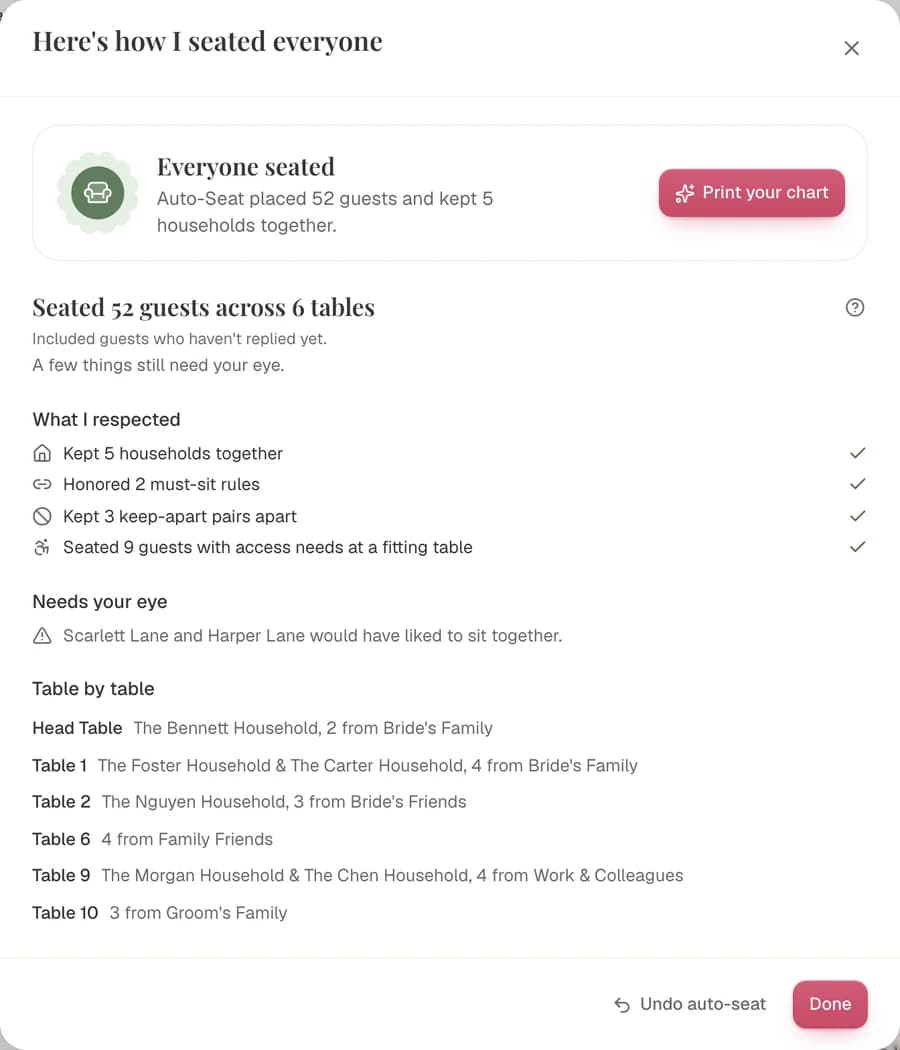
It keeps households together and the guests you tag apart, then shows a recap. You can undo it in one click.
- 01On a computer, open your Guest List.
- 02Download List → Entire Guest List, one guest per row.
- 03Upload the CSV and check the meal column.
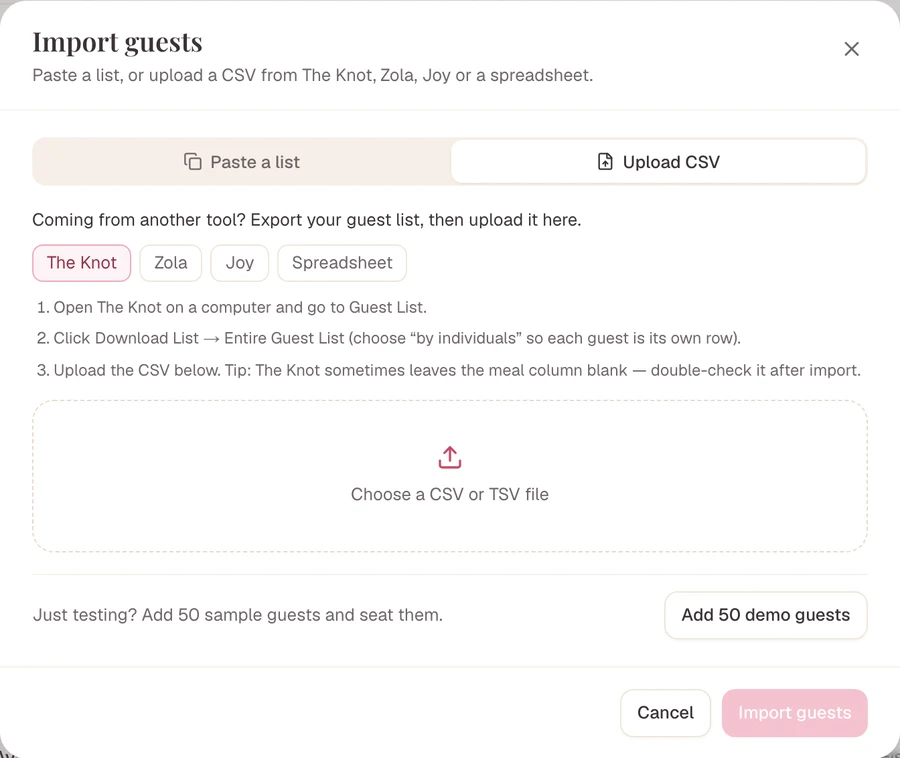
A list that isn’t a neat spreadsheet works too. AI import reads an Excel, CSV, Word or PDF list, or pasted text, and finds the couples, families and plus-ones before Auto-Seat seats them.
In Lovely Seating
Seating that knows who belongs together
Tag who must sit together and who should be kept apart. Auto-Seat seats everyone not yet placed in one click and never moves a guest you’ve already seated.
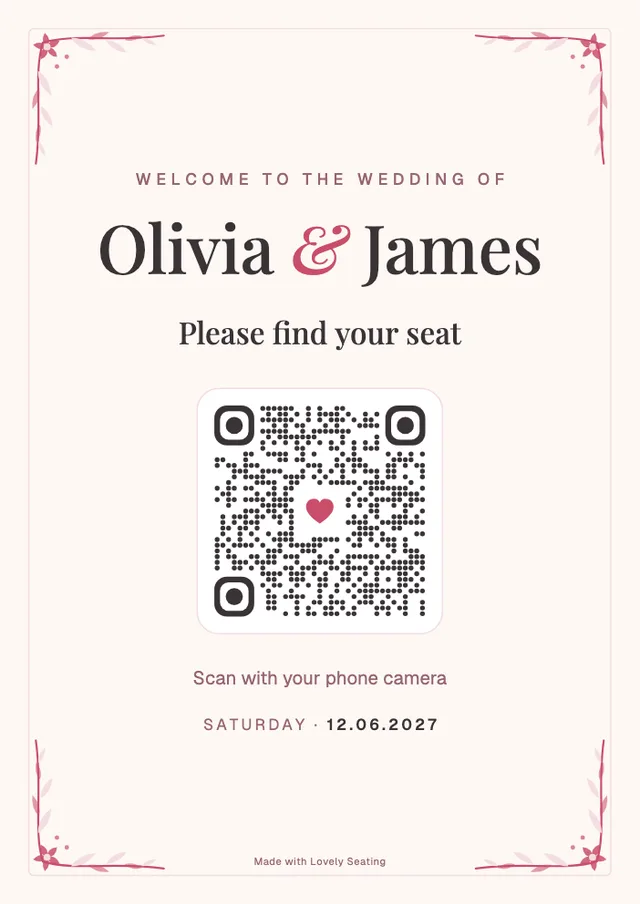
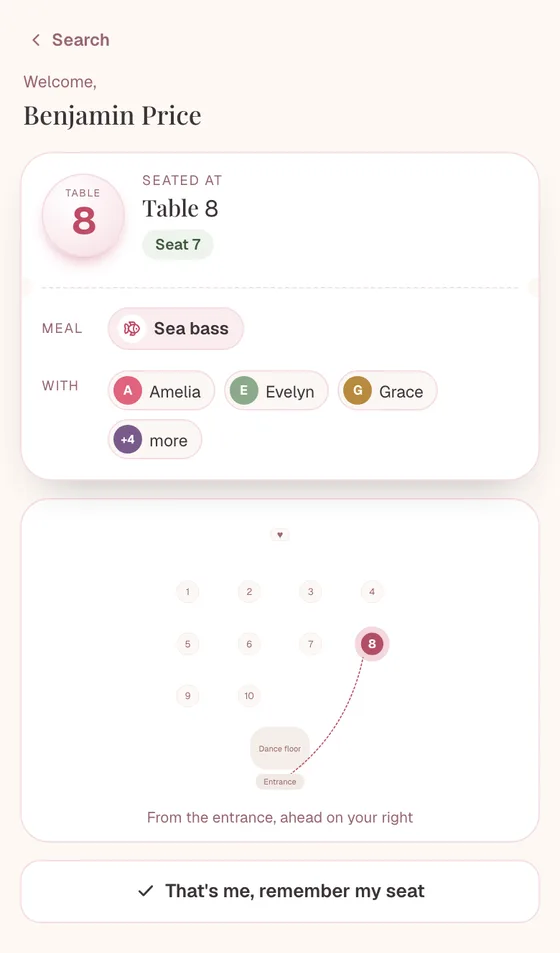
On the day, guests can find their own table. The Find Your Seat page and its QR sign show each guest their table on a map, and update when you move someone.
Every feature is free to use, and outputs show your first 60 seated guests. Pro adds everyone for $39 once, with no subscription.
Frequently asked questions
Which wedding website builders offer seating chart tools?
Of the 11 we checked, five do. Zola has a drag-and-drop floor plan, free up to 15 guests. WeddingWire and Hitched have free floor plans tied to their guest lists. Joy sells its seating chart once per event, with a floor plan and AI seating. WedSites includes seating on its $199 Pro plan. The Knot, Minted, Appy Couple, Riley & Grey, Squarespace and Bridebook have no seating chart builder.
Does The Knot have a seating chart tool?
We found no seating chart builder on The Knot’s own pages in November 2026. Its free guest list tracks RSVPs and meal choices and exports for your vendors, and its shop sells printed seating chart signs. To plan the seats, export the guest list and import it into a seating tool such as Lovely Seating, which has a guided import for The Knot.
Does WeddingWire have a seating chart tool?
Yes. WeddingWire’s seating chart is free and works in the browser under Planning Tools. It syncs with your guest list, lets you add tables, a dance floor, a DJ booth and bars, and covers every event, not only the reception. You drag each guest to a seat yourself, then print, email or export the chart.
Is Zola’s seating chart free?
Partly. Zola’s help center says you can try it free for up to 15 guests, then unlock Premium to add more guests. It works in Zola’s iOS app and on desktop, with tables, a dance floor, bar and cake table, and you download it as a PDF or Excel file. Zola’s wedding website itself is free.
Does Joy have a seating chart?
Yes. Joy’s help center describes a seating chart sold as a one-time purchase per event, with a sample floor plan to explore first. You set the room’s width and length in feet or meters, pick round, rectangle or square tables, and “Seat Guests” uses AI to place your list. Exports are table and meal CSVs and a PDF floor plan.
Which wedding website has seating chart and budget tools?
Zola, WeddingWire and Hitched each have a budget tool next to a seating chart, and Zola’s and Hitched’s say they are free. The Knot has a Budget Advisor but no seating chart builder. If your website is elsewhere, you can still pair it with a free budget calculator and a dedicated seating tool.
Can I keep my wedding website and use a different seating chart app?
Yes, and it’s a common setup. Keep the website for RSVPs, export the guest list as a CSV, then import it into a seating tool. In Lovely Seating you lay out your room, let Auto-Seat place everyone by relationship and print the chart. Every feature is free, and outputs show your first 60 seated guests.

Bring your guest list, seat it here
Keep your wedding website for RSVPs. Import the list, lay out your room and let Auto-Seat place everyone, free for your first 60 seated guests.