
Guests scan a QR and find their seat
Turn your finished plan into a beautiful guest page. Everyone scans one QR code, types their name, and sees their table — no scrum around a printed chart at the door.
It’s themed to your wedding, adds your schedule, menu and venue if you like, updates live as you change seating, keeps every private detail private, and comes down on its own after the day.
Build free, publish with Pro·Works on any phone·Updates live
What is Find Your Seat?
A Find Your Seat QR code opens your wedding’s own guest page: guests scan it, type their name and see their table. It’s the QR code seating chart built into Lovely Seating, made from your finished plan for couples and wedding planners who want to skip the crowd around a printed board. It works in three steps: you publish the page from your plan, put its QR code on a sign, and guests scan it, type their name and see their table on a little map of the room. Building and previewing are free; publishing is part of Pro ($39 one-time per wedding). Want to see one? Open the Ava & Noah demo page and search for a guest.
New to the idea? Our guide to the QR code wedding seating chart covers how they work, where to put the code and whether you still need a print.
What do guests see?
A calm page on their own phone: they search their name and see their table in seconds. You keep one link and one QR, and both always show the current plan.
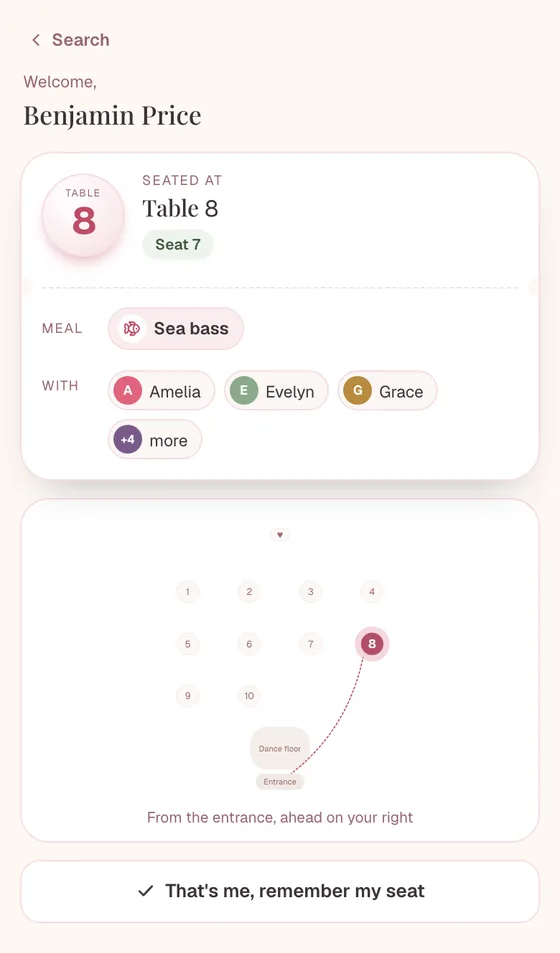
Search, and there it is
Guests type their name and see their table, seat and a map with a path from the entrance. Search forgives typos, accents and common nicknames, so “Bill” finds William. No squinting at a wall-sized chart, no queue at the door.
One QR for everything
Put the same code on a welcome sign, table tents or invitation inserts. Design them in your theme colours and download a print-ready PDF, or just the plain QR.
Only what you switch on
Names are matched on our server, so the guest list never reaches anyone’s phone. Guests see their own table, plus their seat, meal or tablemates’ first names if you allow it. Emails and dietary notes never leave your plan.
Build it, then publish
The QR Code / Seat Finder tab starts filled in from your plan, with a live phone preview. Pick a theme, choose what guests see, and publish. Then share the link, pick a custom one, or design your signs.
It updates live
A late RSVP or a last-minute swap? The page updates every time your plan saves — no reprinting, no stale chart at the door.
How does Find Your Seat work?
Step 1
Seat your guests
Import your guest list (or start from a guest list template), then seat everyone — by hand or with Auto-Seat.Step 2
Publish the page
In the QR Code / Seat Finder tab, pick a theme, choose what guests see, and publish. You get a shareable link, a QR code and a sign designer — see the step-by-step Find Your Seat help.Step 3
Put the QR out
Add it to a welcome sign or your invites, or embed the page on your wedding website — anywhere guests will look for their table.Step 4
Guests find their seat
They scan, type their name, and see their table. “That’s me” saves it on their phone. Change the seating later and the page updates itself.
Themed to match your wedding
The guest page isn’t a generic form — it starts on the same theme as your seating chart, so it feels like part of your wedding from the first tap.
Or pick one of 24 site themes: your chart’s 7, trending palettes like Dusty Blue, Terracotta Sunset and Emerald & Gold, and venue looks like Black Tie, Rustic Barn and Vineyard. Fine-tune the accent to your florals; every theme is contrast-checked so it stays readable. Your names, date, ceremony time and venue sit on the cover, with an optional welcome line.
Add a schedule with a countdown, your menu with each guest’s own meal highlighted, and the venue address with directions — each one optional.
Use the same theme across your chart, place cards and guest page for a set that feels made together.
A printed chart freezes. This doesn’t.
The moment you print a seating chart, it’s out of date if anyone moves. Keep the guest page live and it always shows the current plan — so a Friday-night RSVP change is already right when guests arrive on Saturday.
Prefer to lock it in? Pause live updates before the day and it stops changing. Either way, guest names come down on their own a few days after the wedding, so there’s nothing to clean up.
Can I put Find Your Seat on my wedding website?
Yes. Once your page is published, the QR Code / Seat Finder tab gives you a short embed snippet. Paste it into any site builder that accepts HTML — Squarespace, Wix or WordPress, for example — and guests can look up their table right on your wedding website before the day. It’s the same live page as the QR code, so it always shows your current seating. Zola and The Knot websites don’t allow embeds, so share the link there instead.
What should a “Please find your seat” sign say?
Keep it short and warm, and let the QR code do the work. A few lines that read well from a few steps away (our “please find your seat” sign wording guide has dozens more, from classic to bilingual):
- “Please find your seat” — with “Scan to find your table” underneath
- “Welcome! Scan to find your seat”
- “Find your seat — scan, type your name, and you’re there”
You don’t have to design it yourself: the sign creator makes a welcome sign, frame print, table tents or invitation inserts in your theme colours, with your headline, your names and date, and a QR code in soft dots, rounded or classic style (with an optional heart in the centre and a floral frame). Download a print-ready PDF with bleed, from A4 up to 24×36″, or a PNG. Guests scan, type their name and see their table, so there’s no need for a printed list beside it. Your table number cards can carry a small QR too: scanning it at the table shows who’s sitting there (and your menu and schedule, if you’ve added them), and it follows your latest seating.
Prefer a printed board as well? Make an alphabetical seating chart from the same plan, or matching place cards and escort cards.
Example: Olivia & James’s welcome sign
Fictional sample data, used to demonstrate the product.
With their 126 guests seated, Olivia and James publish a Find Your Seat page and drop the QR onto a little welcome sign by the door — and onto their wedding website so guests can check ahead.
Two guests cancel the week of the wedding and one household is reshuffled. They just update the seating plan; the page is already right — no reprinting the big chart. After the honeymoon, the page quietly comes down on its own.
No crowd at the entrance, no “which table am I again?” — everyone finds themselves in seconds. (Still deciding who sits where? Start with our wedding seating chart etiquette guide.)
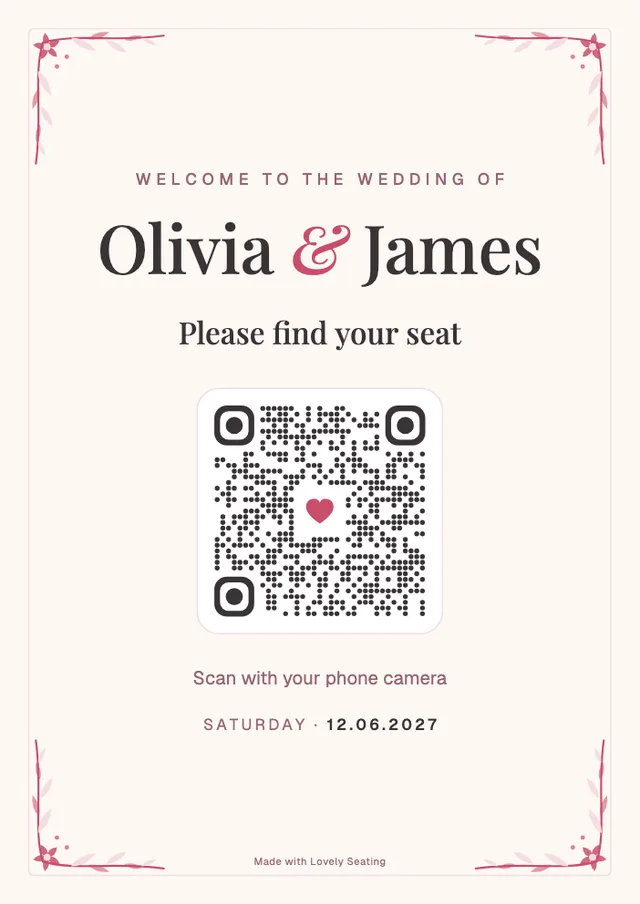
A wall-sized printout — or a QR everyone scans
A printed chart is one copy, in one spot, frozen the day you printed it. A guest page is on every phone, always current.
One frozen copy at the door
- Everyone crowds one board to find a name
- Out of date the moment someone moves
- Reprint the whole thing for one change
- Hard to read from the back of a queue
- Nothing for guests to check ahead of time
On every guest’s phone
- Each guest searches their own name
- Always shows the current seating
- Change the plan — the page updates
- Big, readable result on their screen
- Share the link before the day too
It’s not either/or — many couples still print a chart or place cards and add the QR for convenience. Pair it with an alphabetical guest finder for a lovely printed backup.
Made for couples and wedding planners
For engaged couples
Give guests a modern, effortless way to find their seat — and skip the giant printout. Publish in a couple of clicks, share the QR, done.
For wedding planners
One QR per wedding that always reflects the latest plan, right up to the day. White-label it on the Agency plan so it’s fully your brand.
Good to know
A guest page, not the guest list
The guest list is never sent to the browser. Each search is matched on our server and returns at most five names, so nobody can browse or download the list. The map shows tables, never names, and contact details and dietary notes are never exposed.
It comes down after the wedding
Guest names and tables come down a few days after your wedding date, then a short thank-you note from you shows for a few weeks before the page is gone. You can also take it down at any time.
Publishing is a Pro feature
Building and previewing your page with your own guests is free. Publishing it, a custom link and sign downloads are part of Pro — $39 one-time for your wedding, not a subscription.
Guests need nothing installed
It’s just a web page — any phone camera opens it. There’s no app to download, and once a guest taps “That’s me”, their seat stays on their phone even if the venue wifi drops.
How much does Find Your Seat cost?
Building your seating plan and your Find Your Seat page is free, and you can preview the page with your own guests. Publishing it, choosing a custom link and downloading its QR code and signs is part of Pro: $39 one-time for one wedding, with no subscription. Pro also unlocks print-ready exports and place cards, so you can print a backup chart from the same plan. Wedding planners on the Agency plan can white-label the page to remove the Lovely Seating credit.
Find Your Seat questions
How do guests find their seat?
They scan your QR code (or open the link), type their name, and see their table and a map with their table glowing. If you allow it, they also see their seat, meal and tablemates’ first names. Search forgives typos, accents, common nicknames and partner surnames, and you can add your own nicknames for any guest. Couples seated together come back as one result.
What can guests actually see?
Only what you switch on: the guest’s own table, plus their seat number, meal and tablemates’ first names if you choose. The guest list stays on our server — each search returns at most five matches — so nobody can browse or download it. Emails, phone numbers, dietary and accessibility notes and keep-apart reasons are never shared.
Does the page update if I change the seating?
Yes — that’s the point. Keep it live and the page re-publishes every time your plan saves, from any screen, so a last-minute RSVP or swap is already correct when guests arrive. You can also pause it before the day if you’d rather lock it in.
Do guests need to download an app?
No. It’s a normal web page that opens in any phone’s browser or camera. Once a guest taps “That’s me”, their seat is saved on their phone, so it’s still there if the venue wifi drops.
Can I add our schedule and menu?
Yes. Switch on a schedule (with a countdown, and the next moment highlighted on the day), a menu (each guest sees their own meal highlighted) and a venue section with directions and notes like parking or dress code. All of them are optional.
Is there an official “please find your seat” website?
“Please find your seat” is a common line on wedding signs, not a single service. With Lovely Seating, the official page for your wedding is the Find Your Seat page you publish from your own plan: it has its own private link and QR code, shows only names and tables, and comes down after the wedding.
Do I need a separate find your seat website?
No. Publishing gives you a hosted guest page with its own link and QR code, so there’s nothing to build or host. If you already have a wedding website, you can also embed the same live page there, or simply link to it.
What is a find your seat QR code?
It’s one QR code that opens your wedding’s Find Your Seat page, where each guest types their name and sees their table. Put it on a welcome sign, table tents or invitation inserts made in the sign creator, or download the plain QR for your own designs.
Can I put a passcode on the page?
Yes, if you want one. It’s off by default: switch it on under Link & passcode, and guests type it once before they search. Put it on your sign or invitation. The page is also hidden from search engines, so it isn’t listed on Google.
Can I see whether guests are using it?
Yes. Once the page is live, the builder shows visits, how many guests found their seat, shares, and the names people searched for but didn’t find. Fix a miss in one tap by adding it as a nickname for the right guest. Only you and your collaborators see these numbers, and they’re deleted after the wedding.
Can I change the link after printing the QR code?
Yes. Pick a custom link like /find/emma-and-james under Link & passcode, and the old link keeps working, so QR codes you’ve already printed still open your page.
How much does Find Your Seat cost?
Building your page and previewing it with your own guests is free. Publishing it, a custom link and sign downloads are a Pro feature — $39 one-time for one wedding, not a subscription. Agency plans can white-label the page to remove the Lovely Seating credit.
What happens to the page after the wedding?
Search switches off the day after your wedding, and guest names and tables are removed 3 days after it. Then the page shows a thank-you note from you until 30 days after the wedding, and then it’s gone. With no wedding date set, it comes down a year after its last update. You can also take it down whenever you like.
Can I still print a chart as well?
Absolutely. Many couples print a chart or place cards and add the QR for convenience. The page and your printed exports come from the same plan.
Plan the rest of your seating
- How to make a wedding seating chart The full process, from guest list to the finished plan your QR code shows.
- Wedding seating chart ideas Display ideas for the welcome table — QR signs, boards, escort cards and more.
- Wedding table plan templates A table-by-table list for the venue team and your printed backup.
- Wedding place card templates Matching place cards for each setting, from the same plan.
Give your guests the easiest way to find their seat
Build your plan free, publish a beautiful guest page and QR, and let everyone find their table in seconds.
Works on any phone · Updates live · Comes down after the wedding