
Assign wedding guests to tables and exact seats
Assign guests to tables, pin them to specific chairs when the event calls for it, and adjust the plan without rebuilding your guest list.
Lovely Seating supports simple table assignments and detailed exact-seat planning — so you use the precision that fits your reception, table by table.
Free: unlimited guests & tables·Table-only or exact-seat·Works on your phone too
How do I assign guests to tables?
Seating assignment means giving each guest a table, or an exact chair. In Lovely Seating you drag guests from the guest list onto a table or a specific chair, or open a table and add guests with its searchable picker. Drop someone on a taken chair to swap, lock the placements you’re sure of, and let Auto-Seat place the rest. Assigning tables and exact seats is free, with unlimited guests and tables. To see how the result reads table by table, look at the wedding table plan template.
Can I assign exact seats, not just tables?
Yes. Assign a guest to a table, or pin them to a specific chair where service and place cards demand it — from anywhere in the plan, and both levels can live in the same plan.
Table assignment or exact seats
Seat a guest at a table and let them pick any open chair, or pin them to a specific seat. Use either level — or both — in the same plan.
Assign from wherever you’re working
Set a table from the guest list, the visual floor plan, or a table’s own searchable guest picker — it’s the same assignment everywhere.
What happens when table seating is locked
Lock a guest’s placement and manual moves and Auto-Seat both leave it alone. (Locking a table from its menu is different: it pins the table’s position on the floor plan.)
Mix both levels in one plan
Exact seats at the head table (where 64% of couples sit) and formal tables; simple table assignments everywhere else. No all-or-nothing.
Unassign without deleting
Remove a placement and the guest returns to the pool — still on your list, ready to seat again later.
Table assignment or exact seat: which do I need?
| Table assignment | Exact seat | |
|---|---|---|
| What it fixes | The guest’s table | The guest’s exact chair at that table |
| Best for | Most guest tables, buffets, family-style service | Head table, formal family tables, plated courses, place cards at each setting |
| What guests do | Sit in any open chair at their table | Find their name card at a specific setting |
| Can I mix them? | Yes — in the same plan, table by table | Yes — in the same plan, table by table |
Weighing open versus assigned seating altogether? Read assigned vs open seating at a wedding.
How do I seat guests step by step?
Step 1
Place your groups
Start from an imported guest list (or a guest list template), then drag family and friend groups onto suitable tables.Step 2
Add exact seats
Pin specific chairs for the head table, formal tables or any position you’ve already reviewed — see how exact seats work.Step 3
Move & swap
Drag people between tables; drop onto a taken chair and Lovely Seating offers to swap the two guests.Step 4
Lock & Auto-Seat
Lock the placements you’re sure of, then let Auto-Seat arrange everyone else around them.
Move, swap and adjust as the plan changes
First drafts never survive contact with the RSVPs. Move a guest to another table and the old table frees a place while the new one updates its count.
Drop someone onto a chair that’s already taken and you’re offered a swap — the two guests trade places in one step, instead of unassigning both by hand. And unassigning only removes the placement; the guest stays on your list, ready to seat again.
Plus-ones show a “+1” badge on their chair on the floor plan, so you can see at a glance who came with whom — and Auto-Seat always keeps a host and their +1 at the same table.
Every change keeps the guest record connected to their latest assignment.
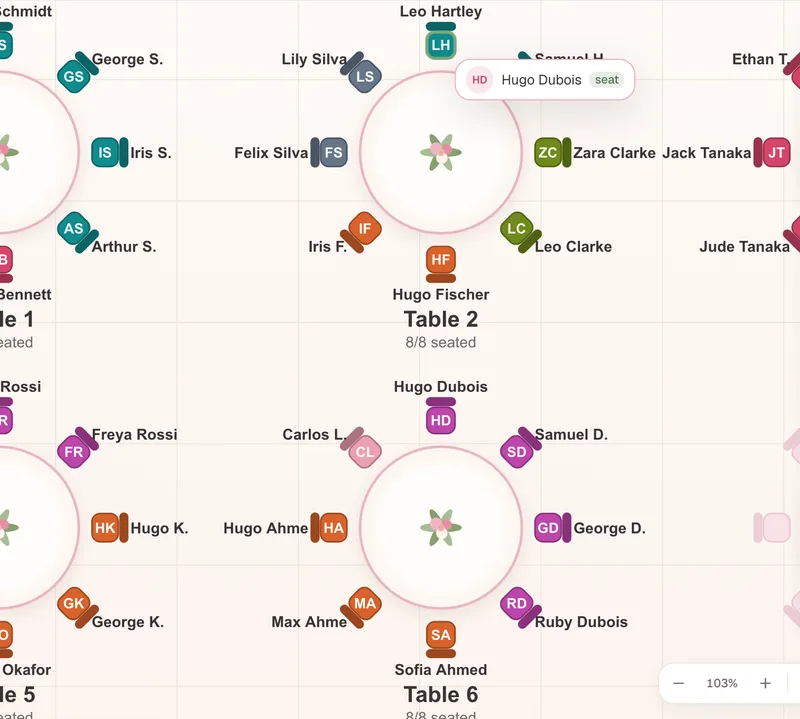
1Drag a guest onto a taken chair
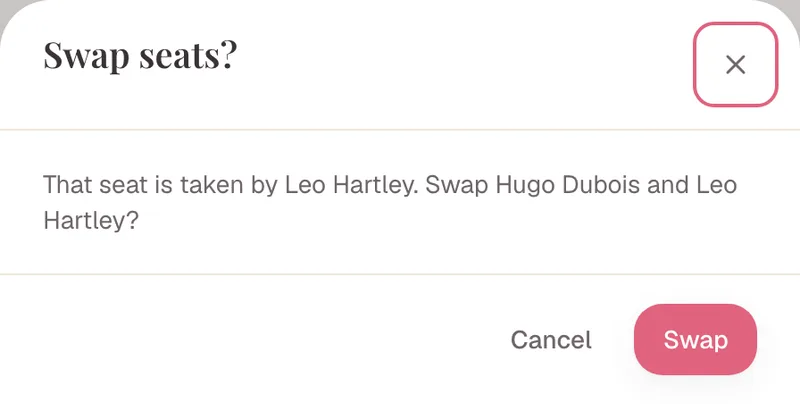
2You’re offered a swap
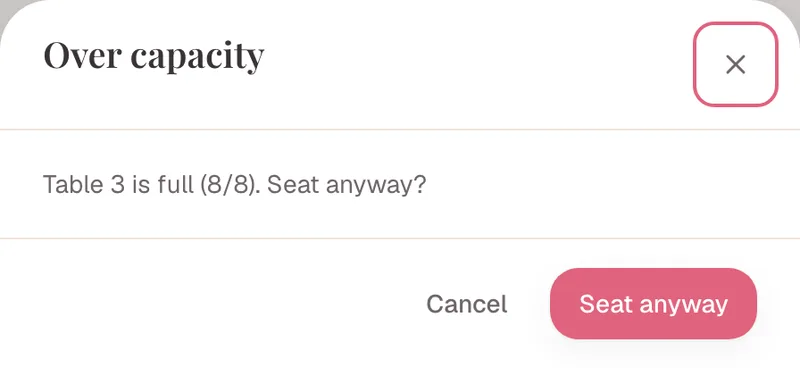
3A full table warns first
Can I assign seats on my phone?
Yes. Lovely Seating works in your phone’s browser as a mobile seating chart app, with nothing to install. In the mobile editor, tap a table in the table drawer, then search and add guests with that table’s guest picker. Moves, swaps and capacity warnings work the same way as on a laptop — a bigger screen is simply easier for a big room.
What happens when a table is full?
Every table has a set number of seats, and each one shows how many are filled, how many are open, and whether it’s full — so you spot the squeeze early. Most finished charts keep a little slack: in 409 weddings planned on Lovely Seating (Jul–Oct 2026), tables seat a median of 8 guests and finished charts leave about 8% of seats empty.
Try to seat one guest too many and you’re warned first. You can move someone instead, or assign anyway when a high chair or a venue confirmation makes it fine — but the table stays flagged as over capacity until it’s resolved. Nothing overfills silently, and a declined guest stops holding their seat.
Example: assigning Olivia & James’s reception
Fictional sample data, used to demonstrate the product.
Olivia and James seat 126 guests with a mixed approach — exact seats at the head table and two formal family tables, and simple table-only assignments for the rest.
They start from the unassigned panel, dropping broad groups onto suitable tables. Olivia and James are locked at the head table; Mia Collins is pinned to Table 7, Seat 4 after her position was reviewed with the venue. When Oliver Davis lands on a taken chair, they swap instead of reshuffling by hand.
When Table 5 hits its eight-person limit, a ninth guest triggers a warning — so Olivia moves two friends to a table with open seats. Precision where it matters, speed everywhere else.
A chart you redraw — or a plan you adjust
Seating changes right up to the week of the wedding. The question is whether each change means starting over.
Every change is a redo
- Redraw the whole chart when one guest moves
- Retype names into a separate design
- Recount seats at each table by hand
- Track locked-in placements in your head
- Email a new version to the venue each time
Adjust in place
- Drag and swap guests without rebuilding
- Capacity counts update themselves
- Lock the placements that are already final
- Declined guests free their seat automatically
- One plan feeds every chart and export
Assign once, then change anything — the plan stays connected to your guest list, capacity and final charts.
Made for couples and wedding planners
For engaged couples
Seat people visually and change your mind as often as you like — the plan keeps up, so a late RSVP never means starting the chart over.
For wedding planners
Give each client exact seats where the venue and caterer need them, lock the placements that are set, and hand over a clean, current plan.
What to know about table & seat assignments
A table assignment and an exact seat differ
A table assignment names the guest’s table; an exact-seat assignment names the specific chair. Lovely Seating supports both — but your wedding may only need one. Table assignments are all a QR code wedding seating chart needs; exact seats are what place cards need.
Unassigning doesn’t delete the guest
Removing a placement returns the guest to the unassigned pool. They stay on your guest list and can be seated again at any time.
Capacity warnings don’t always block you
When a table is full you’re warned before the assignment lands. You can override deliberately, but the table stays marked over capacity until you resolve it.
Locks protect placements, not relationships
Locking two guests at a table keeps their current placements fixed. It doesn’t create a must-sit relationship — use a seating rule when they must always stay together.
Table & seat assignment questions
Do I have to assign every guest to an exact chair?
No. You can assign guests to tables only when exact seats aren’t needed, and reserve exact-chair assignments for the tables or guests that actually require them — like the head table or a plated course.
Can I change an assignment later?
Yes. Guests can be moved, swapped or unassigned as the plan changes. The guest record stays in the plan while only the placement updates.
What happens when I move someone onto an occupied seat?
Lovely Seating offers to swap the two guests — they trade chairs in one step and both assignments stay valid, instead of you unassigning and re-seating each one by hand.
Can I put more guests at a table than its capacity?
You’ll be warned when an assignment would exceed the set capacity. You can continue deliberately — for a high chair, say — but the table stays marked over capacity until it’s resolved. Nothing overfills silently.
Does a declined guest still use a seat?
No. A declined guest stops counting toward active table capacity. If they still have an old assignment, the plan flags it for review rather than letting the stale seat distort the count.
What does it mean when a seat or table is locked?
Locking a guest’s placement blocks manual moves and Auto-Seat from changing it. Locking a table from its menu is different: it pins the table’s position on the floor plan. Neither creates a relationship between guests — use a seating rule for that.
Is table and seat assignment free?
Yes. Assigning guests to tables and exact seats is free, with unlimited guests and tables, and Auto-Seat is included. Pro (a one-time payment) is only needed for print-ready exports, place cards, the Find Your Seat page and collaboration.
Can I assign seats on my phone?
Yes. The mobile editor has a table drawer: tap a table, then search and add guests with its picker. It runs in your phone’s browser — there’s no native app.
How are plus-ones shown?
A plus-one shows a “+1” badge on their chair on the floor plan. Auto-Seat keeps a host and their +1 at the same table.
Can I assign several guests at once?
Yes. Select multiple guests to assign them to a table, move them together or unassign them in one action — handy when a whole group is heading to the same table.
Working out table sizes? See how many guests per table to plan for.
Guides and templates for seating your guests
- How to make a wedding seating chart The full process, from first groups to final checks.
- How to make a wedding guest list A clean list makes every table assignment easier.
- Wedding seating chart ideas Ways to display the finished assignments at the venue.
- Wedding place card templates Cards for guests you’ve pinned to exact seats.
Put every guest in the right place
Start with tables, choose exact chairs where they’re needed, and keep every assignment connected to the same wedding plan.
Free: unlimited guests & tables · Table-only or exact-seat planning · Change assignments anytime