
Tell Lovely Seating who belongs together — then let it seat everyone
Add the relationships that matter: couples who must stay together, friends who’d enjoy the same table, and guests who should be kept apart.
Auto-Seat turns those rules — along with households, groups, table capacities and your locked seats — into an automatic seating chart you can understand, review and change.
Free on every plan·Never resets your chart·One-click undo
Automated seating that follows your rules
Most automatic seating tools shuffle guests by group and stop there. Lovely Seating’s automatic seating starts from what you actually know about your guests: who arrived as a household, who must sit together, who would enjoy the same table, and who should be kept apart. Auto-Seat fills your tables with those rules applied — hard rules first, preferences when there’s room — and respects every table’s seat count. Rules are optional: in 409 weddings planned on Lovely Seating (Jul–Oct 2026), 15% of couples set a together or apart rule. Without any, Auto-Seat still fills tables by household and group. Auto-Seat is free on every plan.
It only fills in guests who don’t have a place yet, so anyone you’ve already seated by hand stays put. That means you can place the head table and the tricky family tables yourself, then let automatic seating handle the remaining hundred names in one click. If a guest can’t be placed without breaking a rule, they’re left unassigned with a reason instead of being forced into the wrong seat. Some auto-assign tools clear every existing assignment and start over; Auto-Seat never does.
It also leaves tables you’ve marked “Reserved — keep empty” alone, always seats a plus-one or linked partner at their host’s table, and if you don’t like the result, one click undoes the whole run.
It’s an editable starting point, not a final answer — you can move anyone afterwards.
Is there a free automatic wedding seating chart generator?
Yes — Lovely Seating’s Auto-Seat is free. It uses your households, groups and three rule types (must sit together, would like to sit together, keep apart), respects locked guests, reserved tables and every table’s seat count, only places guests who aren’t seated yet, and explains anyone it couldn’t place. Undo the whole run in one click if you want to try again. Our help center shows how to add together and apart rules.
Looking for an AI seating chart generator? Upload a messy list to AI guest list import: the AI reads households, groups and plus-ones and turns your answers into rules, then Auto-Seat does the seating.
Can couples sit together on adjacent chairs?
“We would like all couples to sit on adjacent chairs” is one of the most common seating requests, and Lovely Seating handles it in two steps. Auto-Seat always seats linked partners and plus-ones at the same table as their host, and a must-sit rule keeps any other pair or family seat-mates together at one table wherever you move them.
Auto-Seat places guests by table, not by chair. When the exact chair matters — couples side by side, a grandparent next to a helper — drag each person onto neighbouring chairs on the floor plan, and lock them so nothing moves them later. See assigning guests to exact seats for how.
Does automatic seating reset my chart?
Not with Auto-Seat. Some auto-assign features wipe every placement and start again; Auto-Seat only fills the empty seats, so the tables you’ve already worked on are safe.
| Lovely Seating Auto-Seat | A reset-style auto-assign | |
|---|---|---|
| Guests you already seated | Kept exactly where you put them — only unassigned guests are placed | All existing assignments are cleared and everyone is re-placed |
| Locked guests & reserved tables | Always respected | Depends on the tool — check before you run it |
| Guests it can’t place | Left unassigned, each with a reason | Depends on the tool — ask how unplaceable guests are reported |
| Undo | One click undoes the whole run | Depends on the tool |
| Price | Free on every plan, including Free | Depends on the tool — sometimes a paid feature |
The right-hand column describes a general pattern, not a specific product.
Describe the relationships that matter
A broad group is a good start, but real weddings have exceptions. Capture them as clear rules, and Auto-Seat applies them consistently.
Three kinds of relationship
Must sit together and keep apart are hard rules. Would-like-to-sit is a preference honored when there’s room. Keep-apart reasons stay private.
Households, plus the exceptions
Keep an invited household together, and add a cross-household must-sit — like seating a grandmother with the relative who helps her.
Every table comes with a why
Auto-Seat explains each placement from the facts in your plan — which rules held, which group filled the table, what couldn’t be met.
Your locks are respected
Lock the couple, parents or a reviewed placement and Auto-Seat arranges everyone else around them.
Seats the right guests
Attending guests are seated, declined guests are skipped, and you choose whether to include those still awaiting a reply.
How does automatic seating work?
Step 1
Check the rules
First it looks for impossible rules — a must-sit group bigger than any table, or keep-apart guests trapped in one household — and flags them instead of forcing a bad plan.Step 2
Keep your placements
Anyone you’ve already seated — and especially anyone you’ve locked — stays exactly where they are. Auto-Seat arranges around your approved decisions rather than rebuilding them.Step 3
Hardest units first
Large households and tightly-constrained guests go down before flexible individuals, so they don’t get stranded once tables fill.Step 4
Then preferences
With hard rules protected, groups and prefer-sit rules break ties between good tables — and anything left over is shown with a reason.
What does it mean when table seating is locked?
Locked table seating means a guest’s placement — their table, or their exact chair if you’ve assigned one — stays put until you unlock it. Auto-Seat arranges everyone else around your locked seats: the couple at the head table, parents up front, a grandparent close to the exit.
How to lock or unlock a seat: open a seated guest’s details and tap the lock icon next to their table. While a seat is locked, dragging or reassigning that guest is blocked and Lovely Seating tells you the seat is locked — so a stray drag can’t undo a decision you’ve signed off on. Tap the icon again to unlock and move them freely.
A lock protects a placement, not a relationship. It remembers where one guest sits right now; it doesn’t keep two people together. If a couple or a grandparent and helper must always share a table, add a must-sit rule — that keeps applying wherever you move them.
Locking a table from its own menu is different: it pins the table’s position on the floor plan so it can’t be dragged, and doesn’t lock the guests seated there. “Unassign all” clears every table, locked seats included — undo brings them straight back.
Understand why the suggestion was made
An arrangement is far more useful when you can see the reasoning. Every table Auto-Seat fills comes with a factual explanation drawn straight from your plan.
It tells you which household stayed together, which group shaped the table, which hard rules held — and, honestly, which preference it couldn’t satisfy and why (a full table, say). A missed preference doesn’t make the plan invalid; a broken hard rule stays clearly flagged until you resolve it.
It explains facts — not personalities. It won’t claim a table is “socially perfect”.
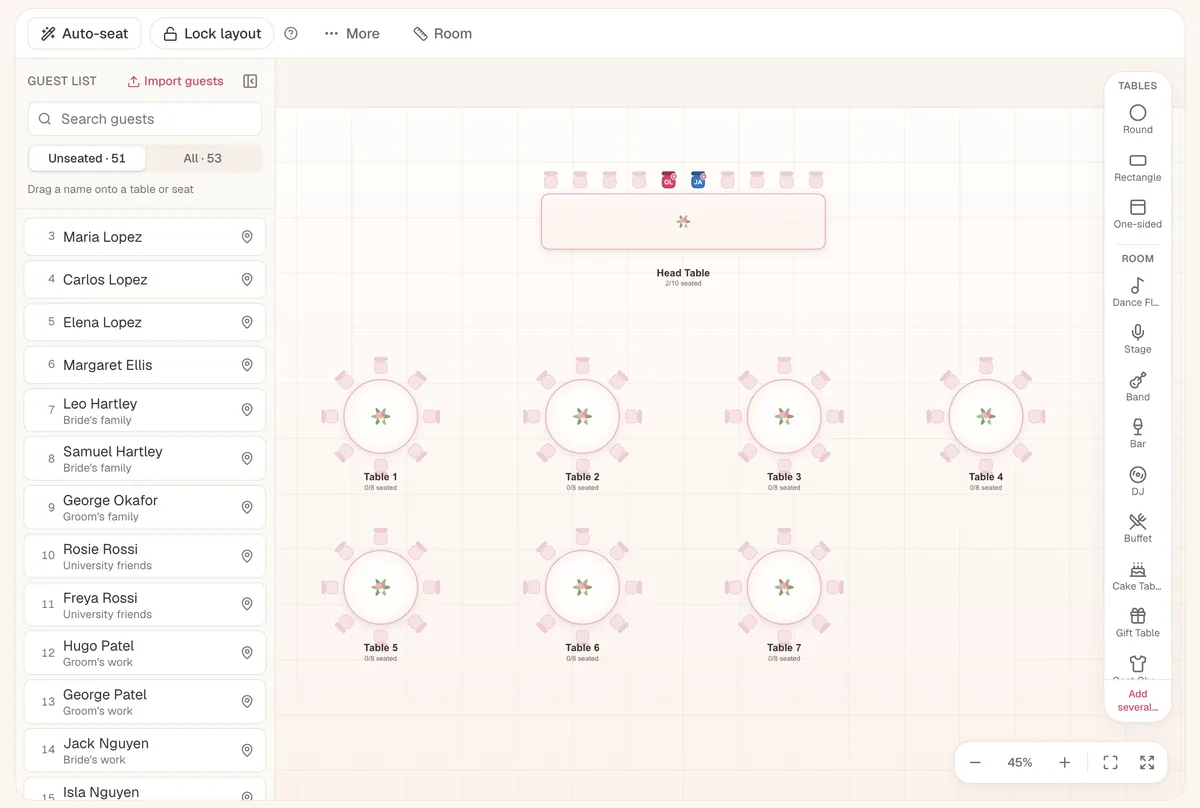
1Before: 51 guests unseated
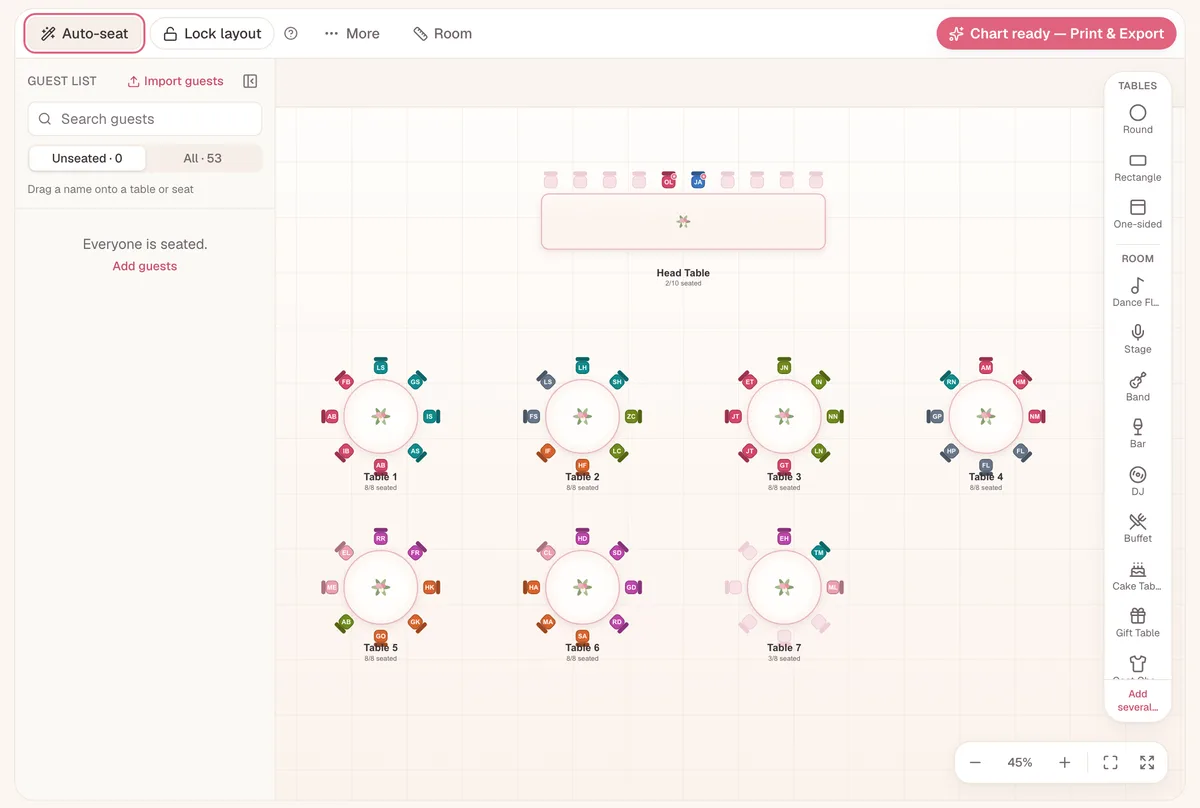
2After one click: every table filled
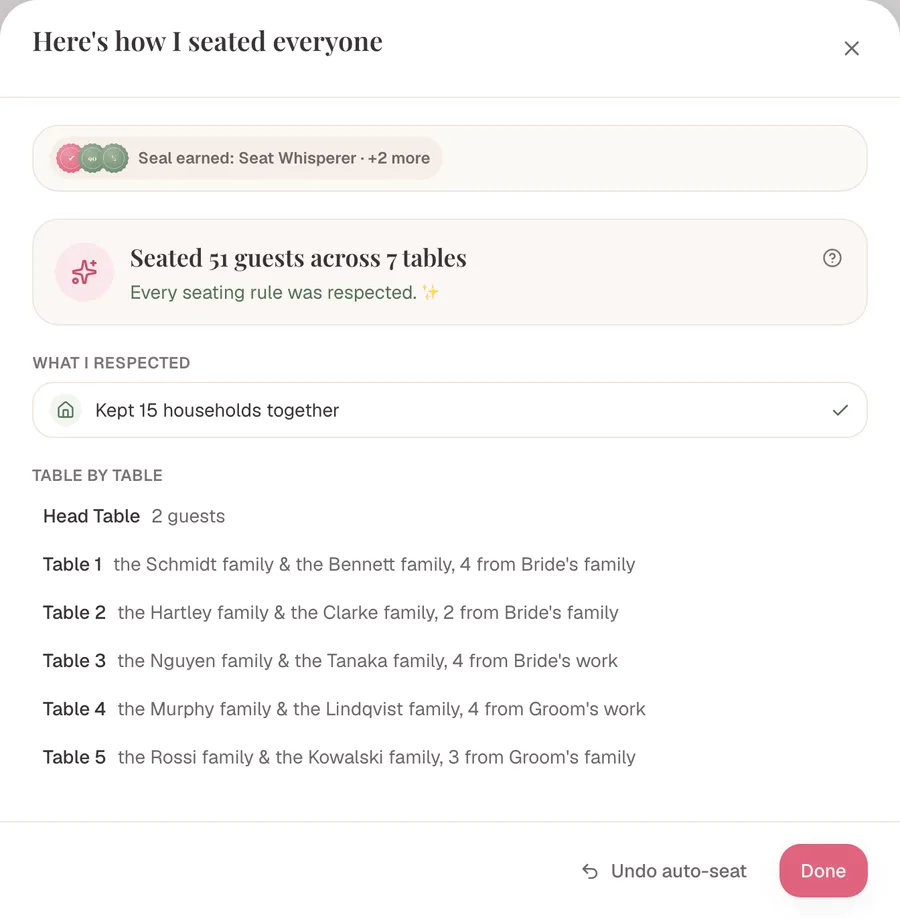
3The recap explains every table
Review and adjust — the rules stay visible
Auto-Seat is a starting point, not a final decision. Move guests, swap seats, unassign, lock what’s approved, and run it again — the suggestion is always editable. Changed your mind entirely? Undo a whole Auto-Seat run or restore an earlier version.
If a manual move would break a hard rule — like splitting a must-sit pair — Lovely Seating tells you, and offers to move both, keep it anyway, or cancel. If you keep it, the rule isn’t deleted: the plan simply shows it as unresolved until you fix it. Keep-apart conflicts get flagged the same way, and the private reason never appears on a guest-facing chart. For one of the most delicate keep-apart cases, see our guide on how to seat divorced parents.
Example: seating Olivia & James’s reception
Fictional sample data, used to demonstrate the product.
Olivia and James have 126 guests across a head table and several rounds. They start with broad groups, then add the exceptions: Olivia’s grandmother must sit with Amelia, who helps her; Sophie would like to sit with Mia; two relatives should stay apart.
They lock themselves and their parents at the head table and run Auto-Seat. It keeps households together, seats Amelia with the grandmother, keeps the two relatives at different tables — and leaves one six-person household unassigned because no remaining table fits them all, explaining it rather than splitting them silently.
Olivia moves two flexible guests to free up room and runs Auto-Seat again, keeping every locked and approved placement intact. The final plan reflects what they told it — and they controlled every table. Then they export it as a printable seating chart for the venue.
Seat by memory — or with your rules applied for you
Both approaches have their place. The difference is whether you have to hold every relationship in your head.
Everything in your head
- Remember every relationship as you drag
- Re-check the whole plan when an RSVP changes
- Easy to overlook a conflict you set weeks ago
- No check that hard rules are even possible
- Great control — but no safety net
Rules applied consistently
- Households and rules applied every time
- Locked decisions always protected
- Impossible rules caught before they land
- Preferences used when there’s room
- Unresolved guests explained, not forced
Auto-Seat doesn’t replace your judgement — it applies the information you’ve already recorded and makes the result easy to review.
Made for couples and wedding planners
For engaged couples
Note the couples, friendships and the one or two tricky pairings — and get a thoughtful starting plan in a click, instead of dragging 120 names by hand.
For wedding planners
Encode each client’s must-sits, keep-aparts and locked tables once, seat late RSVPs without disturbing approved tables, and show the couple exactly why every table looks the way it does.
What to know about relationships & Auto-Seat
Hard rules and preferences differ
Must-sit and keep-apart are hard requirements. Would-like-to-sit is a preference that can go unmet when a stronger rule or table capacity makes it impossible — without making the plan invalid.
A lock is not a relationship
A lock protects a guest’s current placement. A relationship keeps applying even if you later move those guests to another table — the two do different jobs.
Relationships stay private
Must-sit, prefer-sit and keep-apart rules are planning information. They never appear on guest-facing seating charts or place cards — including the reason behind a keep-apart.
It’s a suggestion, not a guarantee
Auto-Seat only knows what you record — it can’t infer unspoken friendships, feelings or family history. It creates a valid starting point from your rules; it can’t promise everyone loves their table.
Seating relationships & Auto-Seat questions
Can Lovely Seating automatically decide who should sit together?
It uses the households, groups and relationships you provide. It can’t know private friendships, family conflicts or unrecorded preferences — the quality of the suggestion depends on what you tell it. AI import helps with the telling: it reads households and groups from your list and asks a few questions, like who shouldn’t sit together, then turns your answers into rules for Auto-Seat.
What’s the difference between “must sit together” and “would like to sit together”?
“Must sit together” is a hard same-table requirement. “Would like to sit together” is a preference Auto-Seat tries to satisfy when it doesn’t clash with a stronger rule or run out of seats.
Can I keep two guests at different tables?
Yes — a keep-apart rule stops the two from sharing a table. The reason stays private and never appears on guest-facing charts or place cards.
What happens when two rules contradict each other?
Auto-Seat catches the conflict — for example a keep-apart pair caught inside the same must-sit household. It flags the affected guests and leaves them for you to resolve rather than producing an invalid plan.
Can Auto-Seat move guests I already placed?
No. Auto-Seat only seats guests who don’t have a place yet — anyone already placed stays where you put them. Lock the placements you’ve approved so they can’t be moved by accident while you keep editing, and build the plan up gradually between runs.
What does it mean when a guest’s seat is locked?
A locked seat keeps that guest at their table (or exact chair) until you unlock it. Auto-Seat seats everyone else around them, and a manual drag or reassignment is blocked with a “seat is locked” message. Unlock it from the lock icon in the guest’s details. A lock protects a placement, not a relationship — use a must-sit rule to keep people together.
Can I change the automatic arrangement?
Always. The suggestion is a starting point — move, swap, unassign and lock guests afterwards, and run Auto-Seat again whenever you like. You can also undo a whole Auto-Seat run in one click.
Is Auto-Seat free?
Yes. Auto-Seat is included on every plan, including Free, with unlimited guests and tables, and running it never clears the seats you’ve already assigned. Pro is only needed for things like print-ready exports, place cards, the Find Your Seat page and collaboration.
Will Auto-Seat fill tables I want to keep empty?
No. Mark a table “Reserved — keep empty” in its details and Auto-Seat leaves it alone.
Will Auto-Seat keep couples together, on adjacent chairs?
Linked partners and plus-ones are always seated at the same table as their host. Auto-Seat places people by table, not by chair, so if you want a couple in neighbouring chairs, drag them to exact seats or lock them where you want them.
What happens when I manually break a must-sit rule?
Lovely Seating warns you and offers to move both guests, keep the change anyway, or cancel. If you keep it, the rule isn’t deleted — the plan shows it as unresolved until you fix it.
Does Auto-Seat consider accessibility needs?
For structured seating needs — like a wheelchair space or a spot near an entrance — Auto-Seat matches guests to a table that can meet them when a suitable table exists. A free-text accessibility note isn’t matched automatically; it stays on the record for you to arrange around.
Households come from your list: import your guest list (AI import can find them for you) or start from a wedding guest list template.
Plan the seating around your rules
- How to make a wedding seating chart Where Auto-Seat fits in the full step-by-step process.
- Assigned vs. open seating Choose table-only, exact-seat or open seating before you add rules.
- How to make a wedding guest list Households and groups recorded here are what Auto-Seat uses.
- Wedding table plan templates Check every table’s guests in one list.
Create a thoughtful starting arrangement
Add the relationships that matter, generate an explainable seating suggestion, and keep full control of the final plan.
You define the relationships · Locked decisions stay protected · Every suggestion stays editable